

How to install a cookie banner
on your WiX website
To ensure the privacy compliance of your WiX website, it is crucial to integrate an efficient Cookie Consent Manager. With CCM19, you get a user-friendly solution that integrates effortlessly into your WiX website and provides a legally compliant cookie banner.
Follow this simple guide to install CCM19 on your WiX site and ensure that your website complies with data protection regulations.
Does your website have a GDPR problem? Check now for free!
How high is the risk of fines for your website? Enter your website address now and find out which cookies and third-party services pose a risk
Step 1: Sign in to WiX
Log in to your WiX account. On the main page, select the website on which you want to install the CCM19 Cookie Consent Manager.
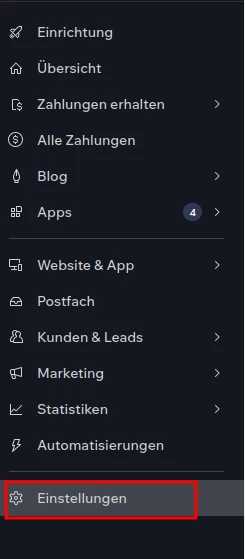
Step 2: Open the website settings in the administration
Navigate to the settings in your website administration, which you will find at the bottom of the left navigation bar.
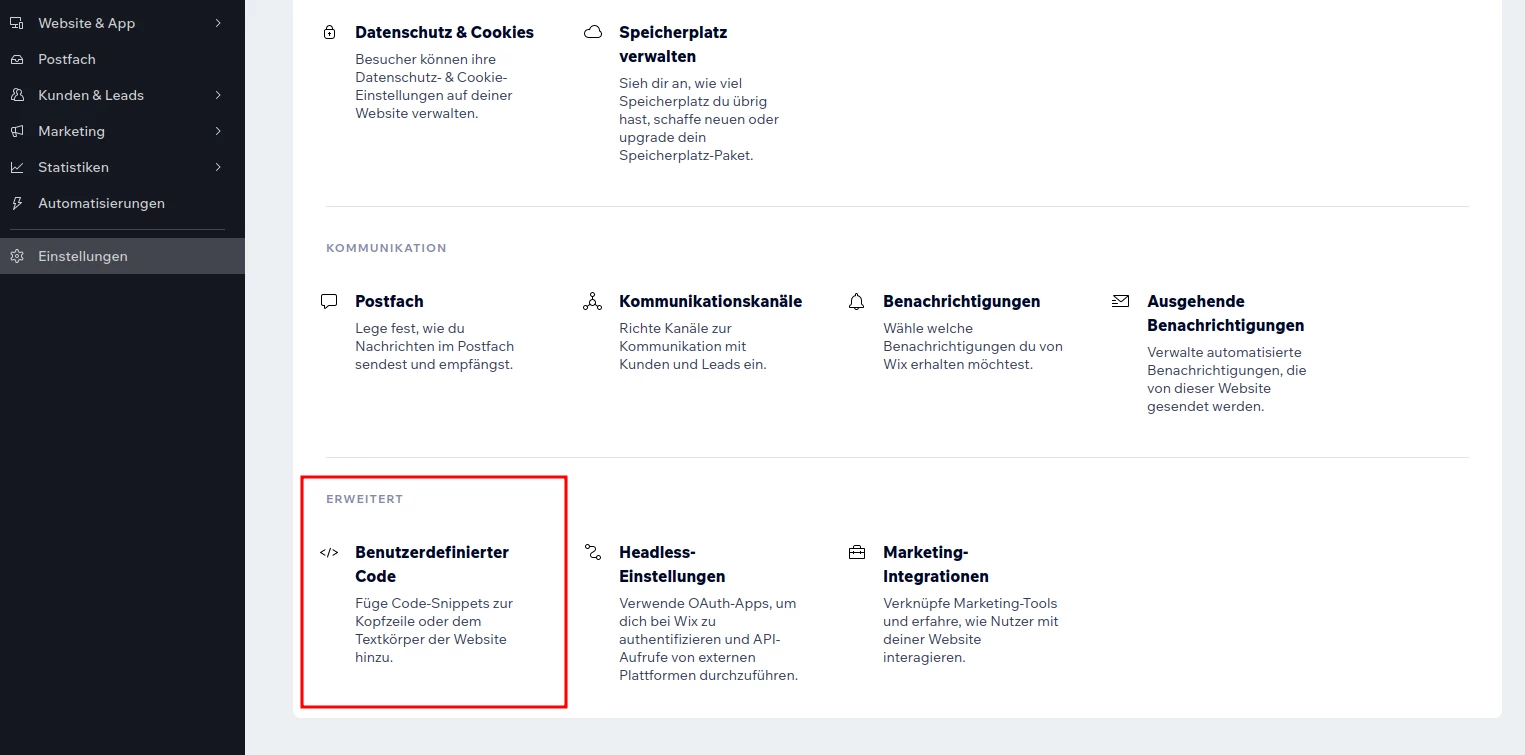
Step 3: Open "Custom code" in WiX administration
In the settings, scroll down to the "Custom code" item. Click on it to open the field for inserting the code.
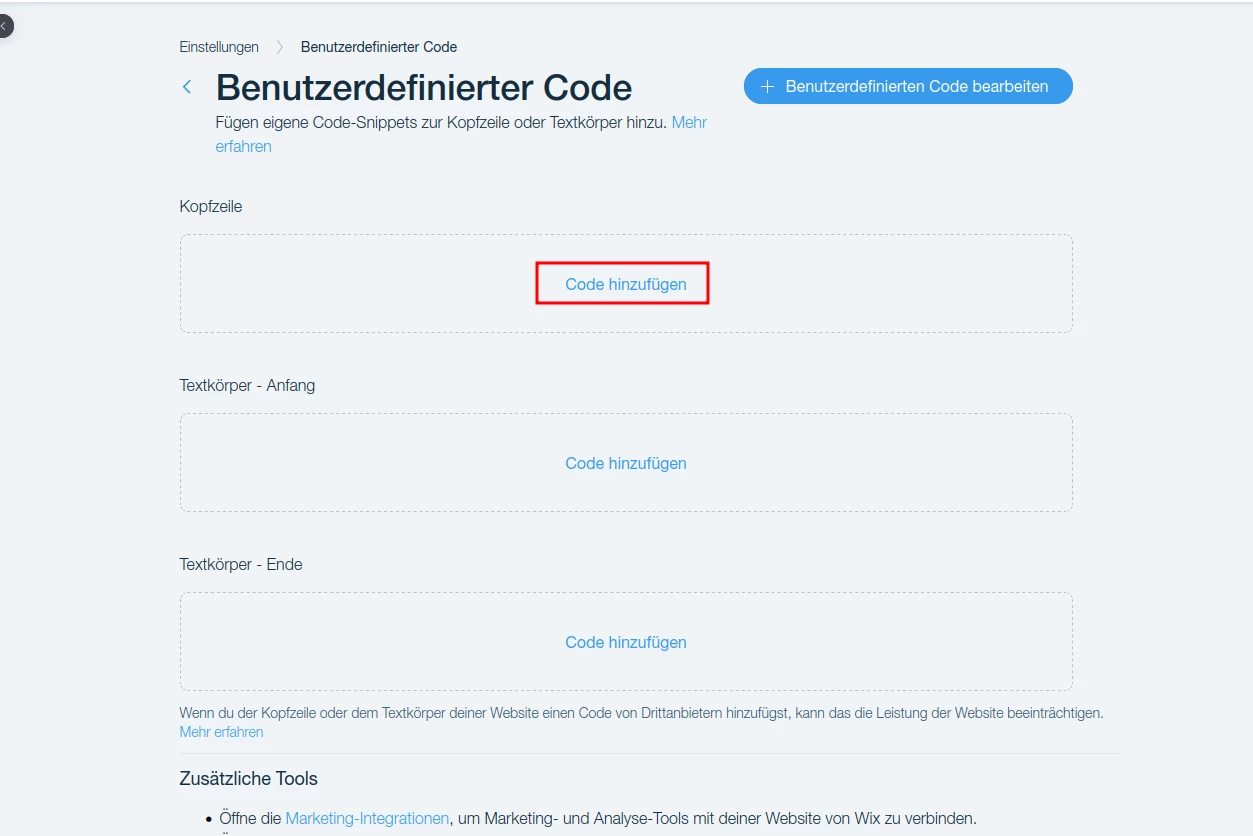
Step 4: Open the header of your WiX website
Select the "Header" area and then click on the "Add code" button.
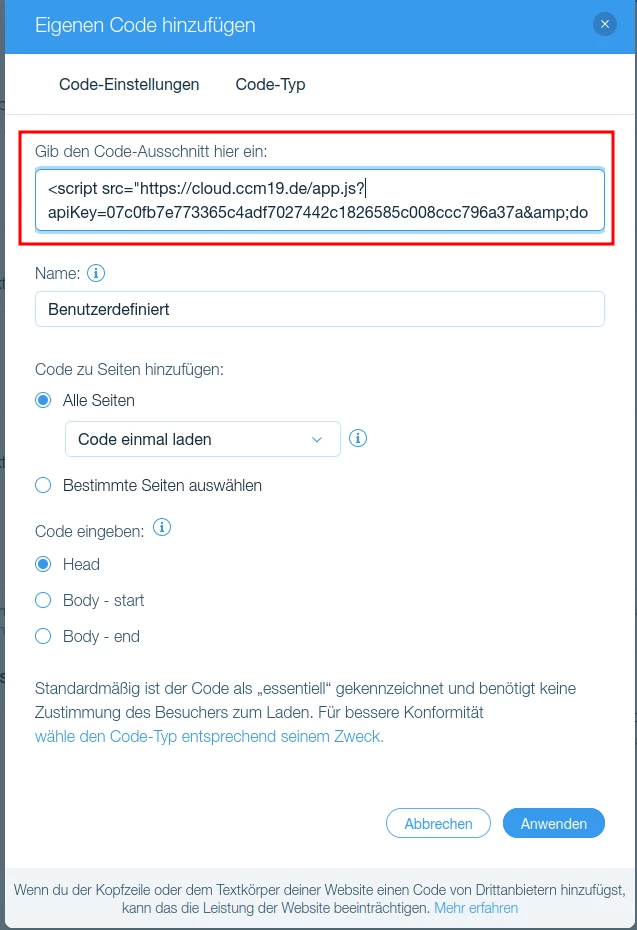
Step 5: Insert CCM19 script code
In the new window you will find a field labeled 'Enter the code snippet here'. Insert the CCM19 code there.
It should then look like this:
Does your website have a GDPR problem? Check now for free!
How high is the risk of fines for your website? Enter your website address now and find out which cookies and third-party services pose a risk
Have you created your CCM19 code snippet yet?
In order to add a cookie banner for your WiX-Wesbite, you must have previously generated a code snippet with our Cookie Consent Manager, start by registering for CCM19 for free. The Free plan remains free forever.
- Registration in CCM19:
Visit the CCM19 website and register here if you do not have an account yet. - Configuring your cookie banner:
Once you have created your account, the quick setup wizard will guide you through the essential steps to set up your cookie banner. This includes an automatic scan of your website looking for features that use cookies. Follow the wizard's instructions to configure your cookie banner settings according to the specific requirements of your WiX website. - Copy code snippet:
A code snippet is generated at the end of the setup. Please copy this. - Integrate the code into your Wix website:
Copy the generated code snippet and follow the instructions at the top of this page to paste it into the header of your Wix website. This will activate the cookie banner and ensure that your website complies with data protection regulations.
Why should you choose the CCM19 cookie banner for your WiX website?
Compliance with the GDPR guidelines
The General Data Protection Regulation (GDPR) sets strict requirements for the processing of personal data by cookies. A key requirement is that website visitors must give their explicit consent for the use of non-essential cookies. In addition, website operators must enable users to easily revoke this consent at any time.
Flexible consent management
CCM19 enables flexible and user-friendly cookie consent management. Users can specify their preferences for different types of cookies and have the option to change their consent at any time with just a few clicks.
Documentation and compliance
Another critical aspect of the GDPR is the documentation obligation. CCM19 helps to track and document all consents. This logging is crucial in order to be able to prove that your website has correctly obtained and managed the required consents in the event of any inspections by supervisory authorities.
Conclusion
With CCM19, you can ensure that your website meets all GDPR requirements. From obtaining consent, to the ability to withdraw that consent at any time, to documentation - CCM19 manages all these aspects efficiently, helping you to minimize legal risks and build trust with your visitors.
Does your website have a GDPR problem? Check now for free!
How high is the risk of fines for your website? Enter your website address now and find out which cookies and third-party services pose a risk
- Step 1: Sign in to WiX
- Step 2: Open the website settings in the administration
- Step 3: Open "Custom code" in WiX administration
- Step 4: Open the header of your WiX website
- Step 5: Insert CCM19 script code
- Have you created your CCM19 code snippet yet?
- Why should you choose the CCM19 cookie banner for your WiX website?
Cookie banner - comprehensively explained
As a website operator, you must provide a cookie banner to c... » weiter
