

Guide: Setting up a
Shopify cookie banner with CCM19
If you run an e-commerce website for Shopify, compliance with the General Data Protection Regulation (GDPR) is essential for your online store.
This makes the implementation of a legally compliant cookie banner essential. For Shopify operators, effective consent management is therefore essential for compliance with data protection regulations and for the integration of a cookie banner.
Regardless of your technical skills, this guide will show you step-by-step how to successfully integrate CCM19's cookie solution into your Shopify store.
The goal is to create a legally compliant and customer-centric cookie banner that both supports the business success of your online store and leads the way in data protection compliance.
To implement a legally compliant cookie banner in Shopify, you can use CCM19. This consent management tool integrates directly through your Shopify theme and provides a customized solution outside of the Shopify App Store.
Does your website have a GDPR problem? Check now for free!
How high is the risk of fines for your website? Enter your website address now and find out which cookies and third-party services pose a risk
What options are there for creating a legally compliant cookie banner for Shopify?
There are two ways to integrate a legally compliant cookie banner into your Shopify store. You can either install an application via the Shopify App Store or use CCM19 for more flexibility and control.
Why CCM19 for your Shopify store?
CCM19 makes it possible to transparently manage your customers' consent to the use of technically non-essential cookies. In addition, the consent tool offers the possibility to individually define which cookies are considered essential in order to enable even more specific customization to the needs of your online store.
This extensive customization capability is particularly beneficial for Shopify stores that require tailored cookie settings to meet specific legal and customer-related requirements.
In addition, CCM19 has a setup wizard that guides you through the entire process of configuring the cookie banner in just a few steps, saving you time and allowing you to get up and running quickly.
With CCM19, you can be sure that your online store meets all GDPR requirements with regard to cookies and external content.
Does your website have a GDPR problem? Check now for free!
How high is the risk of fines for your website? Enter your website address now and find out which cookies and third-party services pose a risk
How to integrate a cookie banner for Shopify with CCM19
Step 1: Log in to CCM19 and use the quick setup wizard
- Start by logging in to CCM19.
- Once you have created your account, the quick setup wizard will guide you through the basic steps to set up your cookie banner. This includes an automatic scan of your website looking for features that store cookies. This comprehensive analysis helps to ensure that all relevant cookies are captured and managed accordingly in the cookie banner. Follow the instructions of the wizard to customize the settings of your cookie banner according to the requirements of your Shopify store.
- After the quick setup, you will receive a code snippet. This must now be integrated into your Shopify website.
Step 2: Integrate JavaScript code into Shopify
After you have created your free account with CCM19 and completed the quick setup wizard, copy the generated JavaScript code.
- Log in to www.shopify.com with your account.
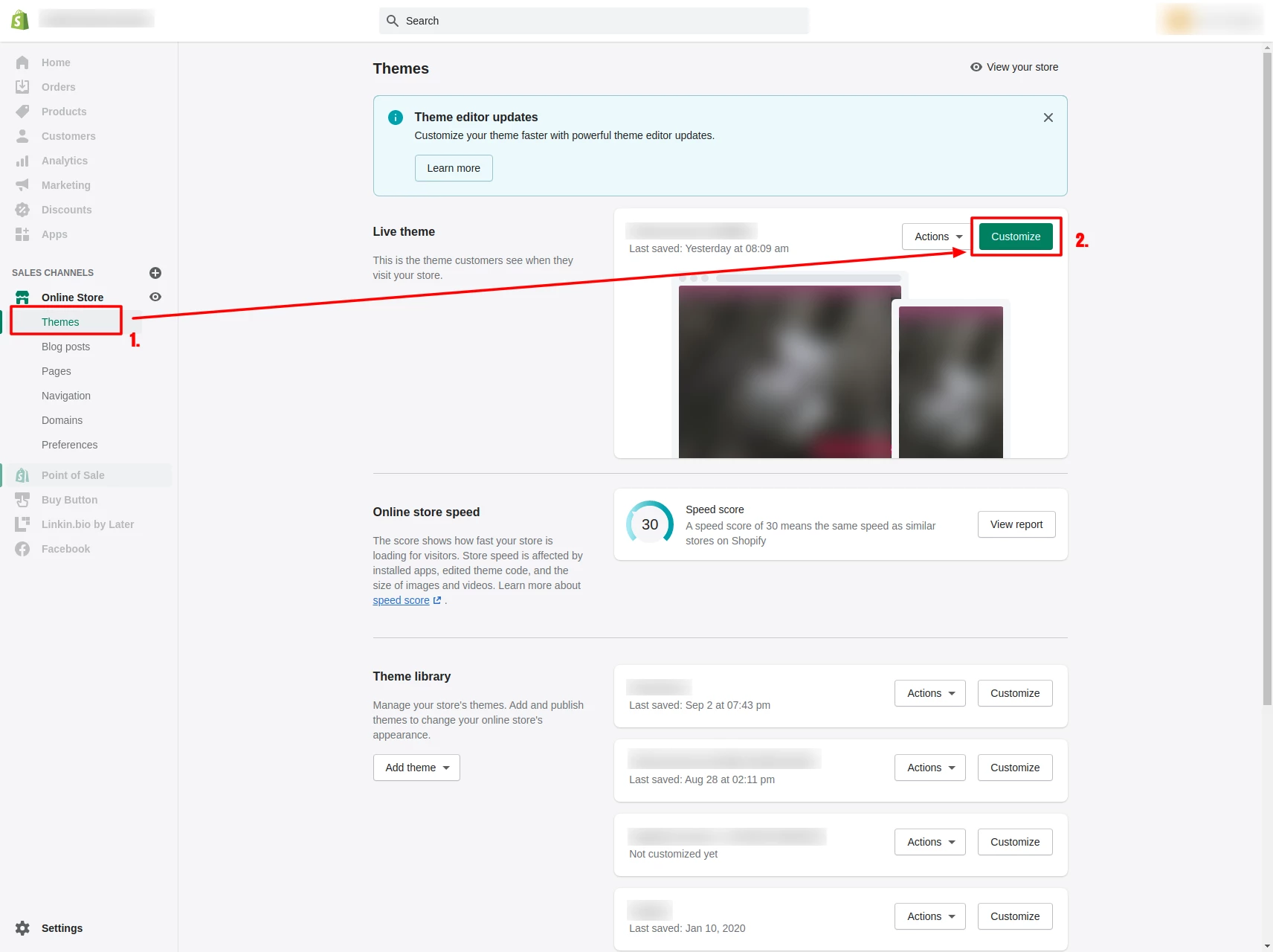
- Navigate to "Online Store" and click on "Themes".
- Now click on the green "Customize" button.
In this area, you can paste the copied code into your Shopify theme to activate the cookie banner on your site.
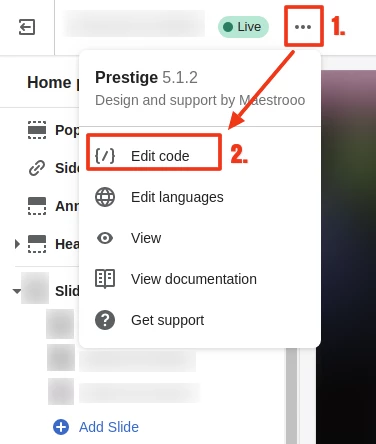
- Open the settings and select "Edit code".
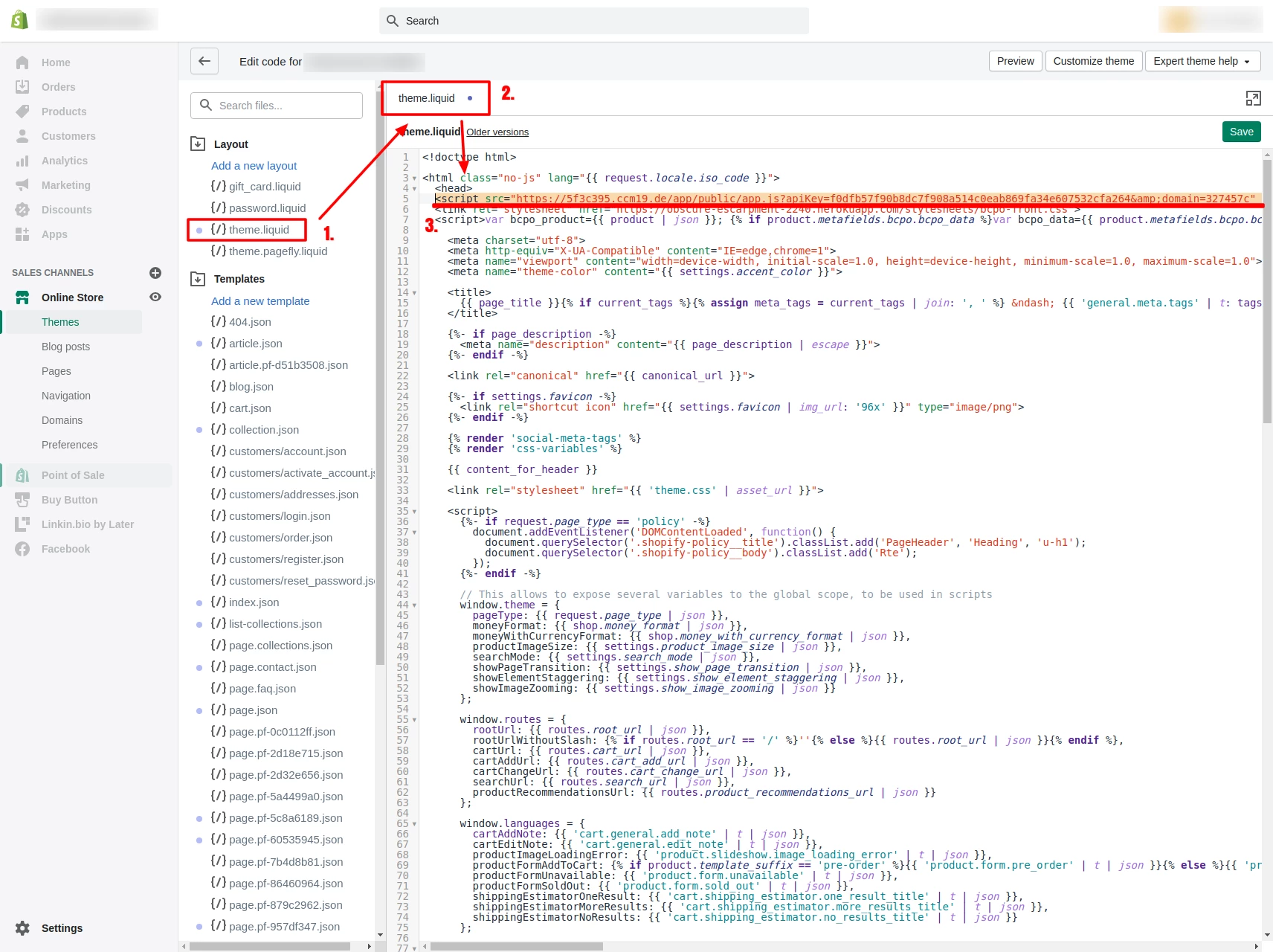
You will then be taken to an overview of the file structure of your store.
- Navigate to the "Layout" section and open the "theme.liquid" file.
- Paste the previously copied CCM19 code snippet directly into the <head> area.
Step 3: Test whether the cookie banner is displayed on your Shopify page
After implementing the CCM19 code in your Shopify page, check in the frontend of your Shopify store whether the cookie banner is displayed correctly. Make sure that the banner is activated in the CCM19 dashboard settings.
FAQs on the topic: Shopify Cookie Banner
What is a Shopify cookie banner?
A Shopify cookie banner is an information banner that appears on a Shopify page to inform visitors about the use of cookies and to obtain their consent, especially for cookies that are not technically necessary. This is necessary to comply with legal requirements, in particular the GDPR.
Why do I need a cookie banner for Shopify?
A legally compliant cookie banner is necessary to protect the privacy of users and to make transparent which cookies or external scripts are used and for what purpose. It helps to build customer trust by giving them control over their data.
How can I implement a cookie banner in my Shopify store?
You can set up a cookie banner either by installing a specialized app from the Shopify App Store or by integrating an external cookie consent tool like CCM19 into your store. If you use CCM19, then all GDPR requirements are met.
Are all Shopify stores required to use a cookie banner?
Not all online stores are required to integrate a cookie banner. A cookie banner is only required if the store uses cookies that are not technically necessary, such as those for analysis and marketing purposes (e.g. Google Analytics or Meta Pixel). According to the General Data Protection Regulation (GDPR), these cookies require the active consent of users before they can be stored on their devices. Further information can be found on the IT-Recht Kanzlei website.
What happens if I do not use a cookie banner in my online store?
The absence of a cookie banner can lead to legal consequences and warnings if you use non-essential cookies. It can also have a negative impact on customer trust, as compliance with data protection laws is an important concern for many consumers.
Can I use CCM19 to determine which cookies are considered essential?
Yes, with consent management tools like CCM19 you can specify in detail which cookies are considered essential and can be set by default, and which cookies require explicit user consent.
How do I make my Shopify cookie banner GDPR compliant?
To be GDPR compliant, your Shopify cookie banner must be clear and understandable, provide an easy way to give or decline consent, and allow users to withdraw their consent at any time. It must also document how and when consent was given.
If you use the CCM19 consent management tool, you can fulfill all these requirements and, after a final check, be sure that your Shopify online store complies with the current data protection guidelines.
How does the cookie banner affect the user experience on my Shopify website?
A well-designed cookie banner has minimal impact on the user experience and offers multiple design options. It should be clear, informative and easy to use without interfering with the visibility of content or navigation on the page.
With the Cookie Consent Manager CCM19, you can fully customize the design of your banner to match your corporate identity. You have the option to choose colors, layout, logo, position and text. For advanced customization, it is even possible to control the design via individual CSS, giving you full design freedom. Of course, there are also useful presets that you can use, but don't have to.
Does your website have a GDPR problem? Check now for free!
How high is the risk of fines for your website? Enter your website address now and find out which cookies and third-party services pose a risk
Cookie banner - comprehensively explained
As a website operator, you must provide a cookie banner to c... » weiter
