

How do you recognize a good cookie consent tool?

The market for cookie consent tools has become very large. Internationally, providers are springing up and promising to solve the cookie problem. So how can you tell which tool is suitable for your own website or that of your customers and which is not? How can you recognize a good cookie consent tool?
What does a cookie consent tool need to do? To help you decide, we have compiled the most important points for you. Make the user comparison: You will find an Excel table at the bottom of the page to help you. Check off the most important points if you are still looking for your favorite tool.
1. Store data in compliance with GDPR
The first and most precarious point: The data that the cookie consent tool provider gets to see basically concerns the surfing history of the entire site. Since the script must be integrated, the providers may gain an extremely deep insight into your website performance. The provider of your future cookie consent tool should therefore only store the data on servers that
- are located within the scope of the GDPR, preferably in Germany
- not be hosted by one of the large cloud providers offered by companies from the USA
The background is as follows:
Since the ECJ ruling of July 16, 2020, it has been clear that the so-called Privacy Shield is ineffective. The transfer of personal data to the USA is no longer legally compliant under this shield. This simply means that "most US service providers may not be used"(https://www.tigges.legal/jus-letter-datenschutz-eu-us-privacy-shield-unwirksam.html)
In addition, the Cloud Act(https://www.heise.de/select/ix/2018/7/1530927567503187) allows the US authorities to access stored data even if it is not stored in the USA. In other words, even if the servers of the American cloud providers are located in Germany, the US authorities still have the potential to intervene.
Taken together, it currently seems impossible to store personal data such as consent data directly on the servers of US providers.
2. Documentation obligation must be fulfilled.
The GDPR imposes a documentation obligation for the storage of the consent(s) given. As a website operator, you must therefore be able to prove at any time that visitor X has given consent Y. Ideally, this is recorded in a searchable log file - so that the operator can verify consent at any time.
Art. 5 para. 2 GDPR defines the "accountability obligation". Controllers must be able to demonstrate compliance with certain data protection principles for which they are responsible. Art. 24 para. 1 GDPR specifies that controllers are obliged to provide evidence that data processing is carried out in accordance with the GDPR.
Unfortunately, this means that many simple cookie banner scripts fall by the wayside: A corresponding log file, which is appropriately anonymized and can only be deanonymized at the moment of the request with the help of the requestor, is usually not available.
3. Simply change or revoke
The cookie consent tool must offer visitors the opportunity to change or revoke their current consent. And just as easily as they have given their consent. Ideally, a button is already provided for this in your Cookie Manager, which you can simply display. This should then open the consent screen again at the touch of a button.
This is another point where many simple cookie scripts fail: They do not offer visitors the option of subsequently changing or deleting the consent given. This only works if the data has been stored correctly in the visitor's browser and on the server (see point 2). Therefore, when making your decision, make sure that the tool in your comparison list fulfills this function.
4. Sufficient description and detailed information
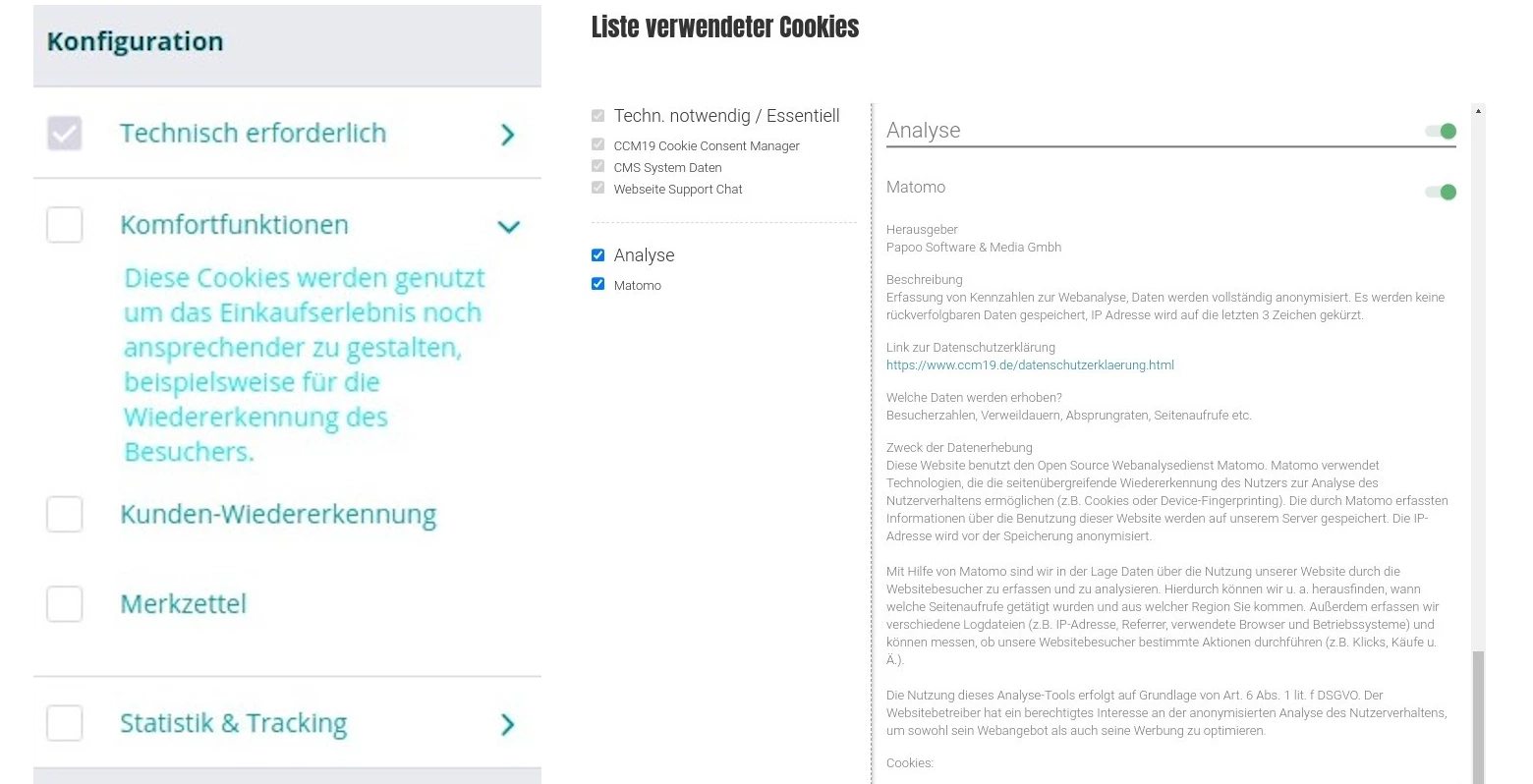
The GDPR stipulates that your visitors must be able to make an informed decision. This means that you as a website operator are obliged to provide as much information as possible about every cookie, script and integration of other data used.
Here is a comparison between a correspondingly informative mask and one that says nothing at all about the use of the data. It should be obvious which of the masks can be used as the basis for an informed decision and which cannot. The simple mask on the left, the detailed one on the right.
5. Tag Manager functionality not just blocking
There are still many cookie tools, especially older ones, that do not block or prevent the scripts used on your site at all - these are ruled out because they are completely unsuitable for applicable law. You can recognize this by running your site through an online scanner. If anomalies are still reported, your cookie consent tool is not working correctly.
A particularly important function that many other providers do not offer is the use as a tag manager. This means, for example, that you do not enter your tracking or other scripts on the page, but directly via the cookie consent tool. This is because the pages must always be designed to save data. This means that no cookies or tracking scripts may be set until effective consent has been given.
If, for example, the consent screen is not displayed or cannot be displayed and tracking or other scripts start without consent, this is exactly what the law wants to prevent. For this reason, the scripts should not be blocked, but should only be integrated once consent has been granted.
Unfortunately, this can often only be achieved with great effort or not at all, especially with modular systems. This is why many use the blocking principle as a stopgap solution. However, as long as you have full control over it, you should rely on the tag manager principle - not the Google Tag Manager.
6. Support
If problems arise - and with more complex sites this can happen from time to time, especially in connection with individual scripts and solutions - you need support that helps you, speaks your language and where you can actually call. You should therefore check in advance whether appropriate support is available.
And check whether you can simply deactivate the consent mask at the touch of a button if problems arise at times when no support is available!
7. Download version - on-premise option
If you operate your website yourself and do not rely on a modular system, you usually also have the option of installing additional software products on your hosting account or server.
If this is the case, you should also use this option and run the cookie consent tool of your choice locally! This way, all your data remains on your server and you retain full control over all data.
Check which cookie consent tool gives you the option of installing it on your own server. Small spoiler: There are very few!
8. Price
The last and of course not insignificant factor in your decision for a cookie consent tool is the price. Free is of course always the best option at this point - but free is usually not free after all. For example, you need to factor in time: For the integration, setup, testing of your site and all functionalities.
This can quickly add up to hours if you have to adapt program scripts, laboriously fiddle with templates, possibly have to call in the agency again, which results in further costs, etc.
Ideally, all you have to do is enter a line of JavaScript via the interface of your CMS/shop system, save it and it is already integrated. Ideally, the configuration should also take place via an interface, so you can save time and money and get the setup done quickly.
When purchasing, make sure that such a solution is possible.
Interested?
Talk to us - you can use our contact form here. Or give us a call on 0228 629 17 642 - we look forward to hearing from you!