
A/B test
What is an A/B test and how does it optimize cookie banners?
An A/B test is a method of comparative analysis in which two versions of a web page, cookie banner or other visual entity are tested to determine which of the two alternatives performs better in terms of predefined metrics. The two variants (A and B) are presented to an audience under identical conditions to find out which version performs better on criteria such as user engagement, conversion rate or other specific goals. A/B testing is often used to optimize the effectiveness of cookie banners by testing different designs and texts to maximize user approval rates.
Does your website have a GDPR problem? Check now for free!
How high is the risk of fines for your website? Enter your website address now and find out which cookies and third-party services pose a risk
How does CCM19 use A/B testing for cookie banners?
In CCM19, the A/B test plugin enables specific functions and procedures for carrying out A/B tests within the frontend using widgets. Below you will find a detailed explanation of the functions and steps required for A/B testing within CCM19.
How to create and edit A/B tests in CCM19?
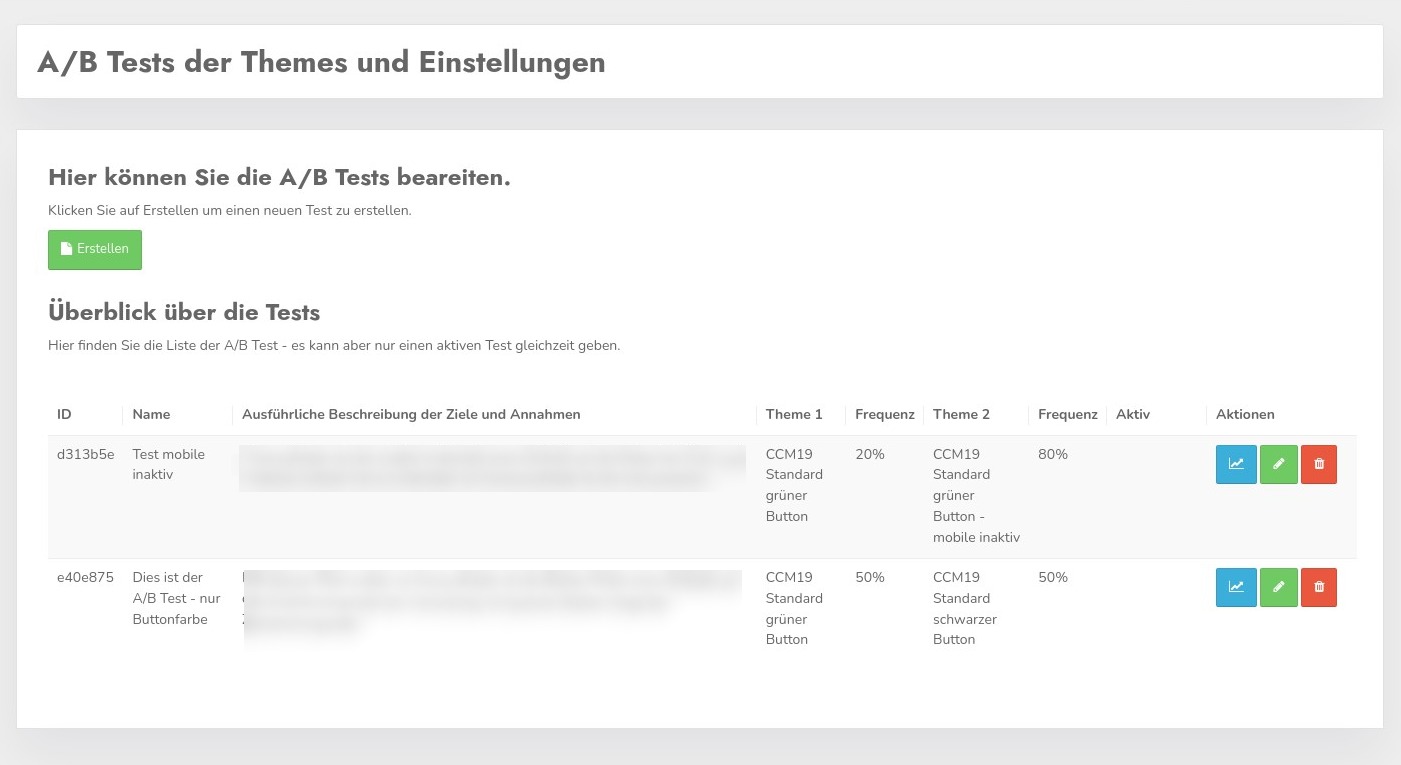
- Creating a test:
By clicking on the green "Create" button, a user can create a new A/B test. The mask used for this is pre-filled, which simplifies the creation process. - Editing a test:
By clicking on the "green pencil" of the respective test, an already created test can be edited.
How to configure A/B tests in CCM19?
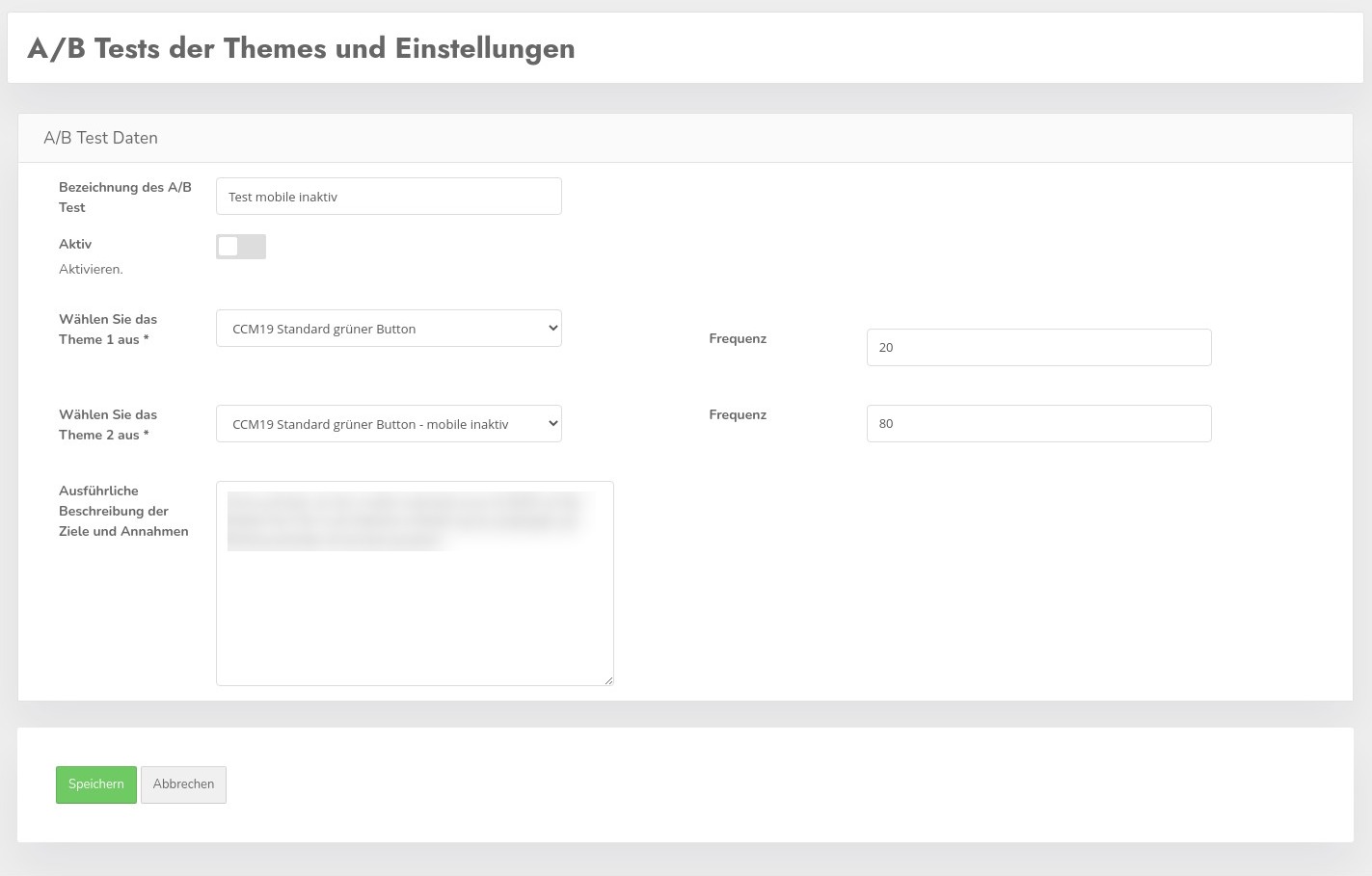
- Theme selection and frequency setting:
Users can select which of the two competing themes should be displayed at which frequency. It is possible to initially show a new theme to only a small proportion of visitors in order to test its effectiveness. - Deactivating the widget cache:
To ensure an effective comparison of the themes, the "Widget cache" must be deactivated in the "Developer settings" menu item. - Activation of the test:
An A/B test only becomes active when the "Activate" switch is set. Only one A/B test can be active at a time.
Tips for choosing the frequency for A/B tests for cookie banners
Determining the right frequency for an A/B test is crucial in order to achieve meaningful and usable results. Frequency indicates what proportion of the audience sees version A and what proportion sees version B of a web page, cookie banner or other digital unit. This is expressed as a percentage, and the default setting is often spread across a ratio such as 20/80. Here are some tips on how to choose the right frequency for your test:
- Define the goal of the test:
Before you set a frequency, you should clearly define what you want to achieve with the test. Is it to evaluate a fundamental change or are you interested in fine-tuning? The riskier or more fundamental the change, the more cautious you should be with the frequency. - Risk assessment:
If a new version (e.g. a new design of a cookie banner) could potentially be controversial or risky, start with a lower frequency for this version, such as 10% to 20%. This limits the risk of a poorly performing version having a negative impact on user experience or business metrics. - Consider traffic volume:
The higher the traffic to your website, the smaller the percentage you can use for experimental purposes. For websites with low traffic, you may want to use higher percentages to achieve statistically significant results in a reasonable amount of time. - Statistical significance:
For meaningful test results, a sufficient number of users must see both variations. Use statistical significance calculation tools to estimate how large your samples need to be for the A/B test results to be reliable. - Adjust during the test:
Monitor the performance of both variants regularly. If preliminary data shows that one version performs significantly worse, you can adjust the frequency or stop the test early to minimize negative effects. - Collect feedback:
Use qualitative feedback from users along with the quantitative data from the A/B test. Sometimes user comments provide insights that pure data cannot. - Long-term planning:
Remember that A/B tests are often iterative. Start with a cautious distribution and plan to adjust the frequency in subsequent tests based on lessons learned and improved versions.
By taking these factors into account, you can ensure that your A/B tests both deliver meaningful results and optimize the user experience on your website without taking unnecessary risks.
How are A/B tests analyzed in CCM19?
- Results analysis:
Clicking on the blue button with the curve takes you to the evaluation of the A/B test. This compares the performance data of the two variants. The variant with the better click rate or another defined success criterion is automatically marked as the winner. - Change history:
In the right-hand column above the graphic, the change history of the test can be viewed, including all modifications made to the themes used.
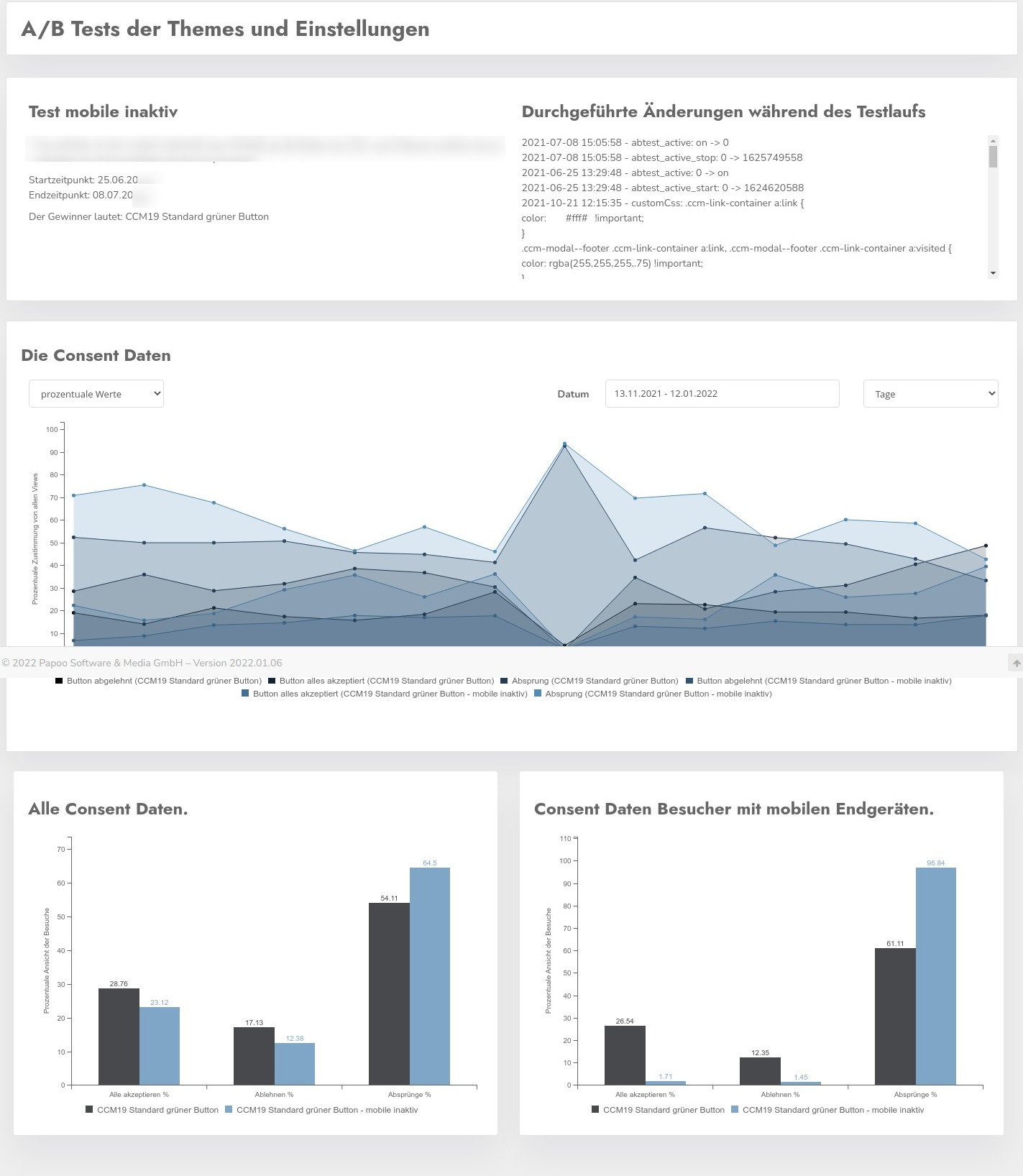
This specific application within CCM19 demonstrates how A/B testing can be used to improve user experience by making data-driven decisions about the most effective design of cookie banners and other user interfaces.
Does your website have a GDPR problem? Check now for free!
How high is the risk of fines for your website? Enter your website address now and find out which cookies and third-party services pose a risk
