

Cookie Consent for TYPO3:
A simple solution for your website
If you use TYPO3 and your website uses non-essential cookies that require explicit consent from visitors, the integration of a cookie consent manager is essential.
Such a manager not only makes it possible to integrate a cookie banner that informs your users about the use of cookies, but also effectively manages their consents and revocations. This is particularly important with regard to the GDPR, as visitors to a website have the right to change their consent to third-party tracking at any time.
The TYPO3 Cookie Consent Extension from CCM19 provides such a solution, ensuring that consent management for cookies on your website runs smoothly and compliantly.
Does your website have a GDPR problem? Check now for free!
How high is the risk of fines for your website? Enter your website address now and find out which cookies and third-party services pose a risk
Why is a cookie consent solution necessary?
Since the ruling of the European Court of Justice in 2019, the explicit consent of users to the use of cookies is required. Websites are legally obliged to obtain clear and informed consent from their visitors before storing cookies that are not necessary for the technical function of a website.
In addition, websites must be able to manage these consents, as visitors have the right to withdraw their consent at any time.
This requires a flexible cookie consent solution that makes it possible to effectively record and update consents and offer users simple options for revoking them.
Advantages of the TYPO3 Cookie Consent Extension from CCM19
CCM19's cookie consent solution makes it possible to be fully GDPR compliant by offering website visitors the ability to change their cookie settings at any time and give active consent for non-essential cookies.
The clear opt-in process ensures that visitors can consciously decide which cookies they want to allow, increasing transparency and control over personal data.
The key benefits of CCM19 at a glance:
- Flexibility and customizability: the extension offers different design variants that can be seamlessly integrated into the corporate design of your website.
- Legally compliant integration of services: The extension ensures that cookies from third-party providers such as Google Analytics and Facebook are only loaded with the explicit consent of the user.
- User-friendly administration: Users can individually set which cookies they accept or reject. These settings are easily accessible and customizable.
- Complete control and transparency: You get detailed insights into the cookies used on your website and can understand what purposes they fulfill.
- GDPR compliance: The extension helps you to easily comply with GDPR requirements.
Does your website have a GDPR problem? Check now for free!
How high is the risk of fines for your website? Enter your website address now and find out which cookies and third-party services pose a risk
How can I install the TYPO3 Cookie Consent Extension?
To install the Cookie Consent Manager CCM19 on your TYPO3 site, follow these steps
1. Add your website in the CCM19 dashboard: If you don't have a CCM19 account yet, then register here for free .2. Copy the JavaScript codeat the end of setting up CCM19 for your website, you will receive a script code. This code must now be integrated into your TYPO3 website.
3. Login to the TYPO3 backend: Log into the TYPO3 backend of your website and navigate to the menu item navigate to the menu item "Template"
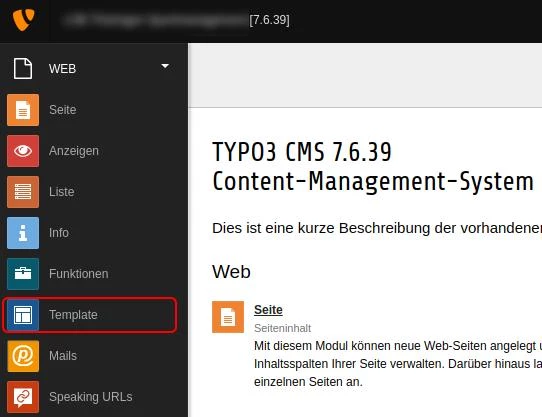
4. Edit template: Open the currently active template of your website.

5.In the "Setup" area of the template, insert the JavaScript code you received earlier.
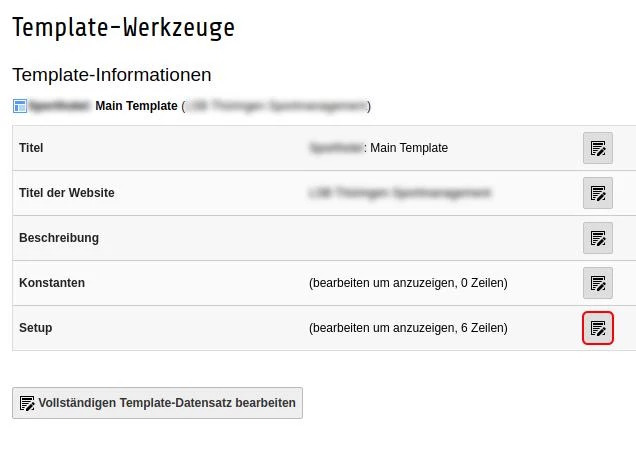
6.Save changes: Save the changes and clear the cache of your TYPO3 page.
After these steps, CCM19 should be active on your website and the banner should now be displayed the first time the page is accessed.
Questions on the topic: Cookie Consent for TYPO3
Is the extension compatible with all TYPO3 versions?
Yes, our Cookie Consent Extension supports TYPO3 versions from 8 LTS to the latest version 12 LTS.
How do I integrate Google Consent Mode in TYPO3?
You can easily activate Google Consent Mode via the backend of CCM19. You can find instructions for integration here.
How does CCM19 handle consent for third-party iframes on TYPO3 websites?
CCM19 enables effective management of user consent for third-party iframes on your TYPO3 website. This feature ensures that third-party content such as videos, maps or social media feeds are not loaded until the visitor has explicitly given their consent.
How is the Google Tag Manager integrated into CCM19?
CCM19 is of course also compatible with Google Tag Manager. For tools or scripts that are integrated via the Tag Manager, CCM19 can be used to obtain prior consent from website visitors.
- Create entry in CCM19 for the Google Tag Manager: First, you must create an entry for the Google Tag Manager in CCM19 under the menu item "Integrations & Cookies".
- Set up a tag in GTM: In Google Tag Manager, create a tag, for example for the web analysis tool Google Analytics.
- Configure triggers: Set a user-defined event as the trigger type.
- Create variables: For each permitted embedding on the page, define a data layer variable that is triggered by the consent.
- Set up a variable filter: Ensure that the tag is only triggered when the appropriate consent is present.
- Test: Use Google Tag Manager's preview mode to make sure the tags trigger correctly before you go live with the changes.
For more details, visit the CCM19 documentation on Google Tag Manager integration.
These steps ensure that the Google Tag Manager integration with CCM19 is done correctly and that all data protection requirements are met.
Does your website have a GDPR problem? Check now for free!
How high is the risk of fines for your website? Enter your website address now and find out which cookies and third-party services pose a risk
Cookie banner - comprehensively explained
As a website operator, you must provide a cookie banner to c... » weiter
