Cookie Banner for WordPress
Our cookie banner can be used on all WordPress pages, regardless of the version. To implement it on your WordPress site, simply insert the CCM19 script into the <head> area. You do not need an additional plugin and with our download version all data remains 100% under your control.
Our CCM19 WordPress cookie plugin is also available for quick integration of the banner.
Our Cookie Consent Manager CCM19 is easy to set up and offers you a GDPR-compliant solution for all cookies for which consent is required. With CCM19, you can easily and effectively comply with legal requirements while offering your website visitors transparency and control over their data.
If you have any questions, our free, English-speaking support team is always happy to help. Please use our support form or simply call us on 0228 536 637 26 (weekdays between 8 a.m. and 5 p.m.).
Start or test now for free
No credit card or payment information required.
Do I really need to provide information about cookies on my website?
Are you unsure whether you even need to include a cookie notice on your website? Simply use our non-binding cookie scanner. The result will show you whether there is a need for action regarding cookies on your website and whether you need a content banner for your WordPress website.
What legal basis applies to WordPress cookie banners?
The General Data Protection Regulation (GDPR) and the Telecommunications and Telemedia Data Protection Act (TDDDG) require consent for the use of non-essential cookies. This means: Before cookies are set that are not technically necessary, the user must actively consent (opt-in procedure). This applies in particular to
- Tracking and analysis cookies (e.g. Google Analytics, Matomo)
- Marketing and advertising cookies (e.g. Facebook Pixel, Google Ads)
- Social media plugins (e.g. YouTube embeds, Instagram feeds)
- Comfort cookies (e.g. language settings, shopping baskets for non-essential features)
Violations of these regulations can be punishedwith fines. CCM19 helps you to comply with these legal requirements.
Manage cookies easily with CCM19
CCM19 gives you full control over the cookies on your WordPress website. You can determine which cookies are essential and which can only be set with the user's consent. This precise and detailed management of cookies allows you to optimize the balance between user-friendliness and data protection. In addition, visitors to your website can change their consent to cookies at any time, as required by the GDPR.
A cookie solution to match your WordPress theme
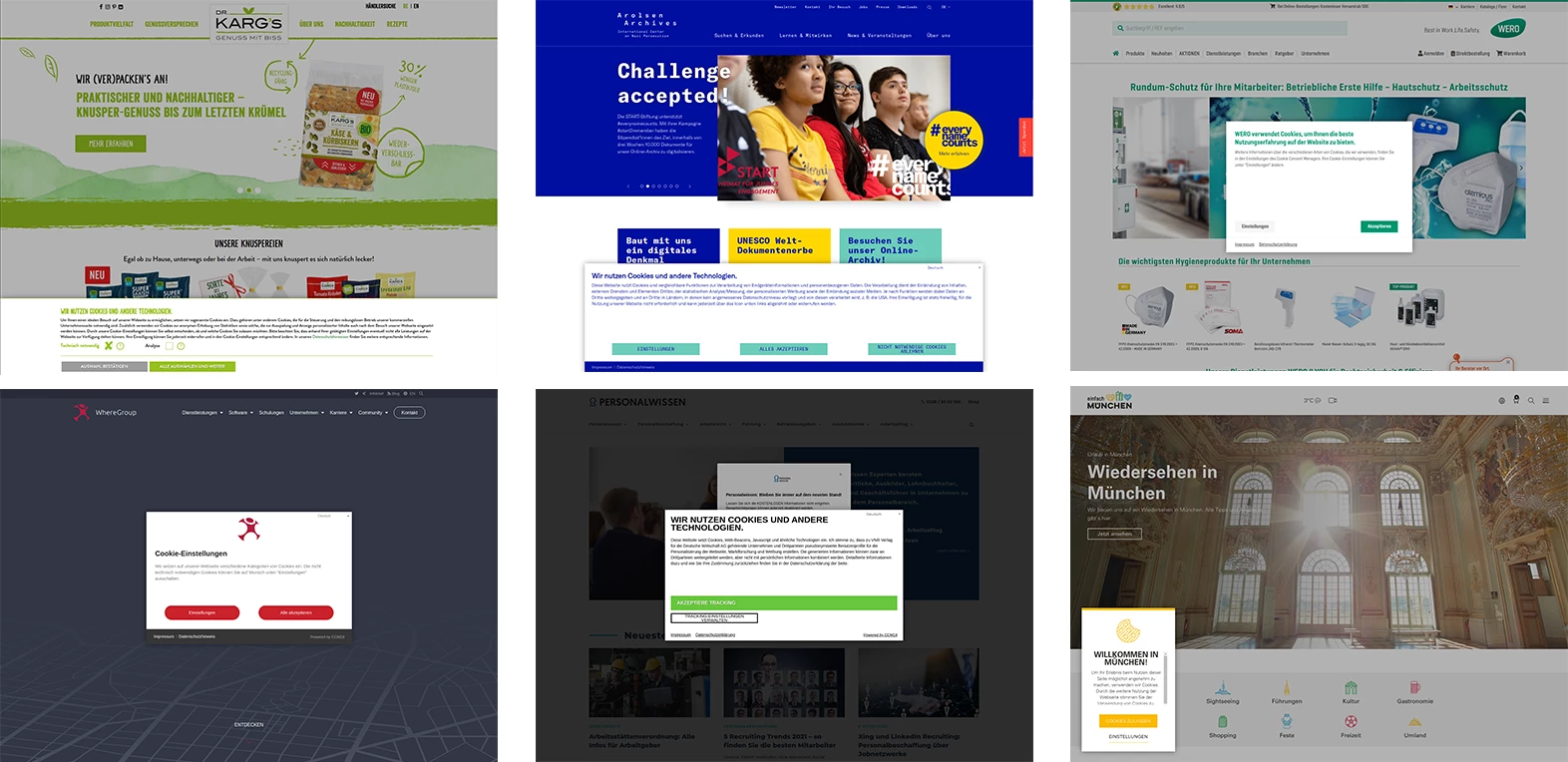
With CCM19, it is possible to customize the cookie notice according to your wishes. You can adjust the colors of the buttons, fonts and background in no time at all using settings in the backend. Thanks to the additional option of storing individual CSS, there are no limits to your creativity.
Here we have put together a few creative implementations from our customers to show you what is possible:
What does a WordPress cookie banner cost?
Our CCM19 tool can be quickly and easily integrated into WordPress. It is available in different tariffs, from the free basic version to the enterprise version, to meet the diverse needs of website operators.
Our CCM19 tool can be quickly and easily integrated into WordPress. It is available in three different tariffs:
| Features | Free Plan | Starter Plan | Business Plan |
|---|---|---|---|
| Price | 0 EUR | 7.90 EUR per month | 19.90 EUR per month |
| Description | Start free of charge - Ideal for first projects and small websites | The perfect start for professional GDPR-compliant websites | Best choice - For companies, portals and large (international) websites |
| Domains | 1 domain | 2 domains | 5 domains (flexibly expandable) |
| Impressions per month | 5,000 | 20,000 | 100,000 (flexibly expandable) |
| Languages | 2 languages (DE/EN) | 2 languages (DE/EN) | 60+ languages |
| Support | Personal support in English | Personal support in English | Personal support in English |
| OnPremise/Download Version | - | Available | Available |
| iFrame Blocking | - | Yes (e.g. YouTube, Google Maps) | Included |
| Users | - | - | Any number of users |
All tariffs can be tested free of charge for 14 days - without credit card or payment information. All data is stored in Germany and the EU, no US providers.
Can't find the right solution for your website? Contact our support team for a customized offer.
How do I add the cookie banner in Wordpress?
Setting up the CCM19 tool is very easy and largely automated thanks to our quick setup.
After a few simple steps, you can use the cookie notice generator on your site.
Integrate the cookie banner in WordPress in three steps
1. Go through the onboarding process:
- After you have registered with CCM19 for free, you will go through an onboarding process for your domain. Our tool scans your website and checks which services and
WordPress plugins use cookies. - As soon as the onboarding process is complete, you will be provided with a code snippet. All you have to do is insert this code into the <head> area of your WordPress page.
2. Install the CCM19 WordPress plugin:
Log in to your WordPress dashboard, then go to 'Plugins' and select 'Add New'. Search for CCM19 and click 'Install'.
3. Add CCM19 code snippet:
- After installing the plugin, a new menu item will appear in the menu on the left-hand side under Settings, called 'CCM19 Cookie Consent'.
- Click on this menu item and insert the code snippet from the CCM19 dashboard.
- Now click on "Save changes" to complete the process.
In individual cases and with particularly tricky cookie constellations, however, the correct configuration can sometimes be more complicated because certain cookies cannot be blocked so easily when a website is called up. Or it is not clear which script is actually responsible for setting certain cookies. In these cases, you can always contact our support team.
These companies already rely on CCM19