

The Google Fonts Checker report contains this information - no registration required, results are displayed immediately!
Once you have carried out our free Google Fonts Checker / Google Fonts Test for your website, you will receive a detailed list of which Google files and fonts you have integrated on your site. The Google Fonts Checker Report from CCM19® contains the following information:
- Listing of Google Fonts that are used on your site and that can lead to warnings.
- Listing of files (CSS / JS) that integrate these Google Fonts and may also lead to warnings.
- Concrete help on how to integrate the fonts locally and thus solve the problem.
- Links to plugins that you can use to integrate the fonts locally.
- Further information about critical embeddings that are subject to the same problem and may lead to further warnings later on.
If you have any questions about the report of our Google Fonts Check, simply ask us for a brief assessment without obligation. Here you can see a small excerpt from the report.
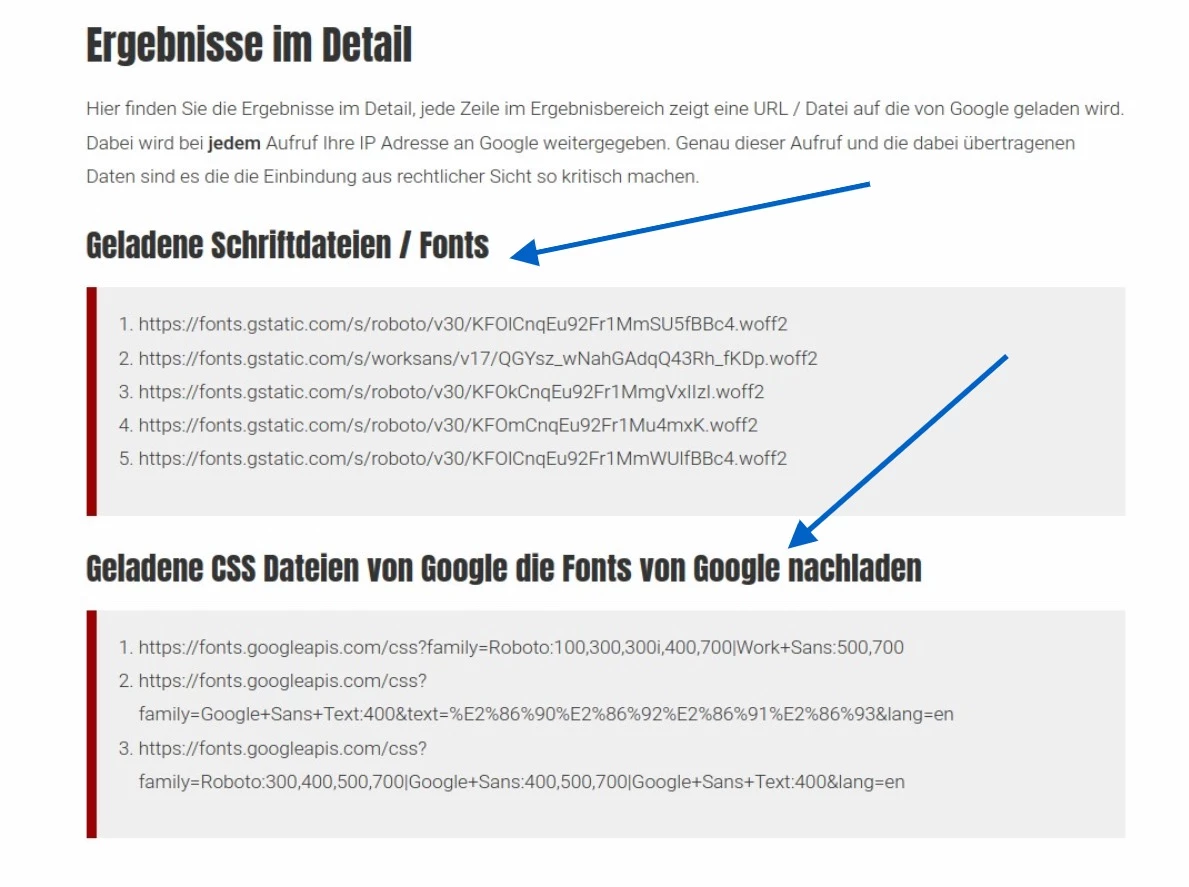
All statements on legal topics on these pages and in the report are of course not legal advice, but our opinion on these topics. For legal advice, please contact a lawyer you trust.
- The Google Fonts Checker report contains this information - no registration required, results are displayed immediately!
- What is a Google Fonts Checker / Google Fonts Scanner / Google Fonts Test?
- Do you use Google Fonts on your website? Find out - with the Google Fonts Check from CCM19
- Can Google Fonts be blocked by Consent Banner?
- Why do you need the Google Fonts Checker?
- How expensive can data protection violations with Google Fonts become?
- Why use the Google Fonts Checker from CCM19?
- How does the Google Fonts Checker work?
- Who currently needs the Google Fonts Checker?
- How do I know if I am using Google Fonts?
- Google Fonts warning / payment request - what to do?
- "Google Fonts" - what is that?
- How are Google Fonts integrated?
- Google Fonts - Data protection background / GDPR - Google Fonts Checker
- Are Google Fonts GDPR compliant?
- What exactly did the Munich Regional Court decide on the subject of Google Fonts?
- Here is the solution - Google Fonts on your own server
- How do you get the files onto your site?
- Integrate Google Fonts into your website
- Local integration via plugin for CMS / store systems
What is a Google Fonts Checker / Google Fonts Scanner / Google Fonts Test?
A Google Font Checker is software that calls up your website or online store via a headless Chrome and finds out in this way whether you are loading fonts from a Google server and are therefore at risk of a warning.
With the help of intelligent algorithms, all files and links are examined. Only the data and links that integrate Google websites are output in the report. In this way, the Google Fonts Checker reliably filters out all font embeddings.
Do you use Google Fonts on your website? Find out - with the Google Fonts Check from CCM19
With the free Google Fonts, Google offers a great service that allows you to use outstanding fonts for your website free of charge. Unfortunately, the system has a catch - data is transferred to the USA.
Background: Every time you call up a file / page on the Internet, at least your current IP address is always transmitted. This is absolutely necessary for technical reasons - without this principle, the Internet would not work. Unfortunately, the transfer of this data to the USA is currently very problematic for various legal reasons.
The transmitted IP address is personal data within the meaning of Section 12 (1) and (2) of the German Telemedia Act (TMG) - this is fairly new, but has recently come into force for all website operators. In addition, Art. 4 No. 1 of the GDPR comes into play here.
The Regional Court of Munich has ruled on this basis (LG Munich, judgment of 20.01.2022, Ref. 3 O 17493/20): Anyone who uses Google Fonts on a website without the user's consent is violating their personal rights. And that can be expensive!
The scan of your website is of course free of charge and if you have any questions about your Google Fonts report, you are always welcome to contact us.
Can Google Fonts be blocked by Consent Banner?
Unfortunately, this is not technically possible. Modern browsers download various resources that they encounter during loading in parallel before they are even executed or used. This means that, for example, font files from Google are loaded in parallel with the script of a consent banner, i.e. long before the consent script can be executed.
It is only possible to load the font files after a consent via the consent banner, but this has the glaring disadvantage that many visitors will then see the wrong fonts if they do not agree to the use of the fonts. In this case, local playout, as described below, is the only sensible and reliable way.
Why do you need the Google Fonts Checker?
You need a Google Fonts Checker to find out whether your website or online store uses Google fonts AND loads these files from Google pages. The Google Fonts Check er shows you whether this is happening. If you use this method to force your visitors to transmit their IP and other data to Google, this can lead to major legal problems.
How expensive can data protection violations with Google Fonts become?
 The Google Fonts themselves are of course free of charge, which is how Google offers these fonts. The fonts from the Google Fonts catalog are published under different licenses, but each license allows you to use them on any website, both business and personal. Further information can be found in the Google FAQ: https://developers.google.com/fonts/faq
However, various cost notes are currently being sent to companies and website operators. These involve payments of EUR 100 or more if a lawyer has also been called in. Even if these demands are probably not really legally tenable (this seems to be the published opinion at the moment), there are still costs involved. Use our free Google Fonts Check to find out whether you have a problem.
The processing time alone that is required to handle the letter, possible legal advice, etc., are all costs that you should save yourself. You may be able to recover the costs in EUR, but nobody can pay you back for your time.
Why use the Google Fonts Checker from CCM19?
The Google Fonts Checker from CCM19 not only provides you with data on whether you are using Google Fonts on your website, but also which fonts they are:
- Exactly which fonts these are
- Which URLs are used to integrate them
- Where exactly you can find a download for these fonts
- And there are detailed instructions on how to integrate them
- In addition, other typical warning and GDPR risks are also tested.
How does the Google Fonts Checker work?
Technically, the process is not really complex. The basis for the processing is a headless Chrome, which we run on a special server in our clusters. If you enter your domain at the top of the query form, the following happens:
- Your domain is checked for meaning and formal correctness.
- The query script forwards the domain to the crawling server in the background.
- This starts a headless Chrome instance in the background, calls up the page in headless Chrome and waits a few seconds until all scripts and files are loaded.
- All data from the headless chrome call is then queried by script, processed and temporarily stored in a database (5 minutes, then the entry expires). All loaded resources, such as Google Fonts files from the Google server, are also stored here.
- The data is returned to the waiting form and processed there
- The processed data is output.
The technologies used are PHP, JS, HTML, MySQL, Linux Server, Headless Chrome.
Who currently needs the Google Fonts Checker?
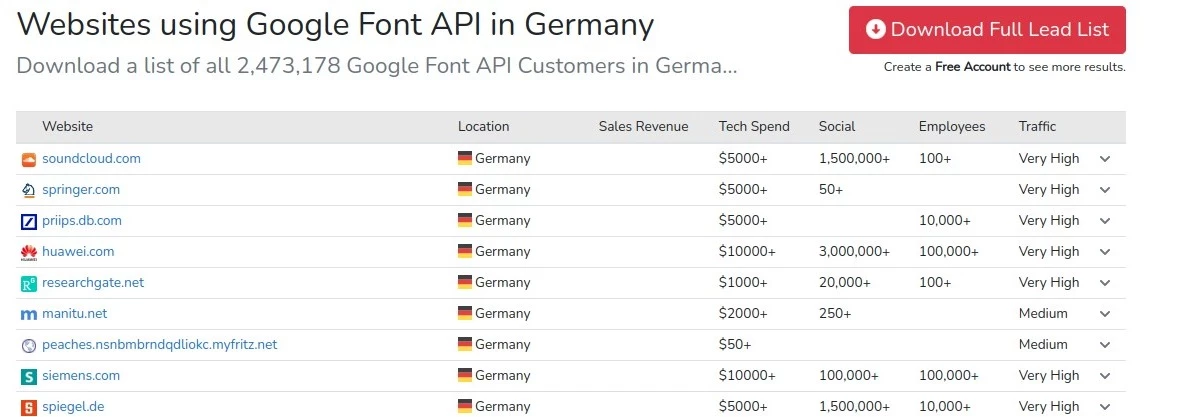
According to Builtwith, there are currently 2.5 million website operators in Germany alone who use the Google Fonts API and integrate Google Fonts directly. Many large providers are affected as well as many small providers. If you want to be sure - use the CCM19 Google Fonts Checker!
With regard to the claims and warning letters, it is more likely that the smaller providers will be contacted, as they are less likely to put up a fight.
How do I know if I am using Google Fonts?
There are various ways to find out whether you are using Google Fonts on your website. In principle, it is not a question of whether you use them, but how you use them. It's the integration that counts. If you have always used Google Fonts locally and have not retrieved the data from Google servers, then you are in the clear and can put the issue to bed.
To find out whether you are loading them directly from Google, you can either use our Google Fonts Checker (spoiler: this is the easiest way) - or open your website in your browser, right-click on your page in the browser and click on "Examine" in the menu that appears. Then do the following.
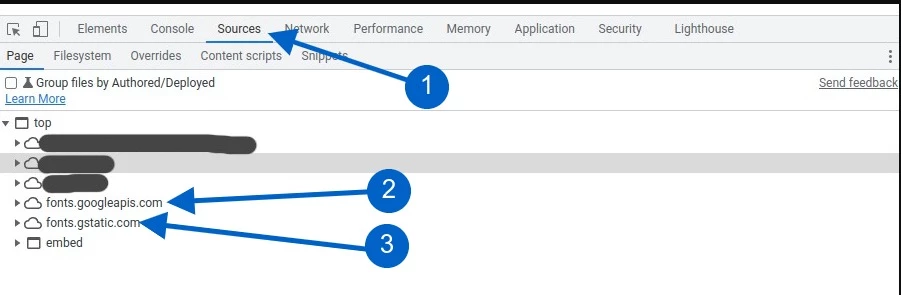
- Click on the "Sources" tab or "Source code".
- Look in the window on the left to see if it says fonts.googleapis.com.
- Check whether fonts.gstatic.com appears there.
If both entries are visible, your site is loading the fonts directly from the Google server, in which case there is an urgent need for action.
Google Fonts warning / payment request - what to do?
If you have now been caught before you have been able to change anything, it will be time-consuming no matter how you look at it. In any case, the first step you should take is to use our Google Fonts Checker to find out whether this is actually true. If you read through the published opinions of various specialist lawyers on this topic, you will not yet find a uniform opinion. Some parties are of the opinion that you should simply pay (and of course eliminate the cause) so that the issue is off the table as quickly as possible. Others are of the opinion that no damage could have been caused at all, or that the transfer of data to Google was even deliberately triggered in order to implement the letter.
There are no other direct rulings on this topic, but others such as the preliminary ruling on Cookiebot suggest the same direction. How and whether there will be further rulings is, in our view, an open question.
If you have received a letter, take a deep breath in any case and then preferably entrust it to a specialist lawyer who can then deal with this issue. Either way, there will be costs. Of course, you can also sit out the letter and simply ignore it, but we do not recommend this.
"Google Fonts" - what is that?
Since 2010, Google has been making fonts available free of charge to anyone interested, including website operators. You can integrate these into your own website free of charge and use them for your own layout.
This has solved a common problem that previously often existed with websites: if they were designed with a font that was not available on every computer, it either had to be downloaded separately or purchased at great expense.
By providing free access, Google has made it possible for many website operators to use modern and elegant fonts for their own sites without incurring horrendous costs for font licenses.
The fact that Google also offered these fonts directly for download and integration via a CDN meant that many operators were able to dispense with hosting these fonts themselves. You can find out whether this is the case for you with our Google Fonts Checker. At that time, this process even contributed to a better loading time. However, modern browsers work differently, so this advantage is now irrelevant and in many cases even counterproductive.
How are Google Fonts integrated?
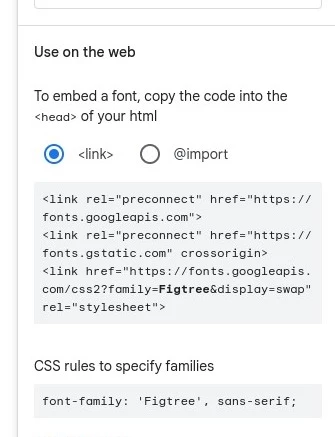
There are basically two ways to use Google Fonts. The first way is via your own website. Here, the fonts are downloaded from Google Fonts and stored locally on your own server. There is no connection to the Google servers, as the fonts are no longer loaded from the Google servers. All files are stored on your own server.
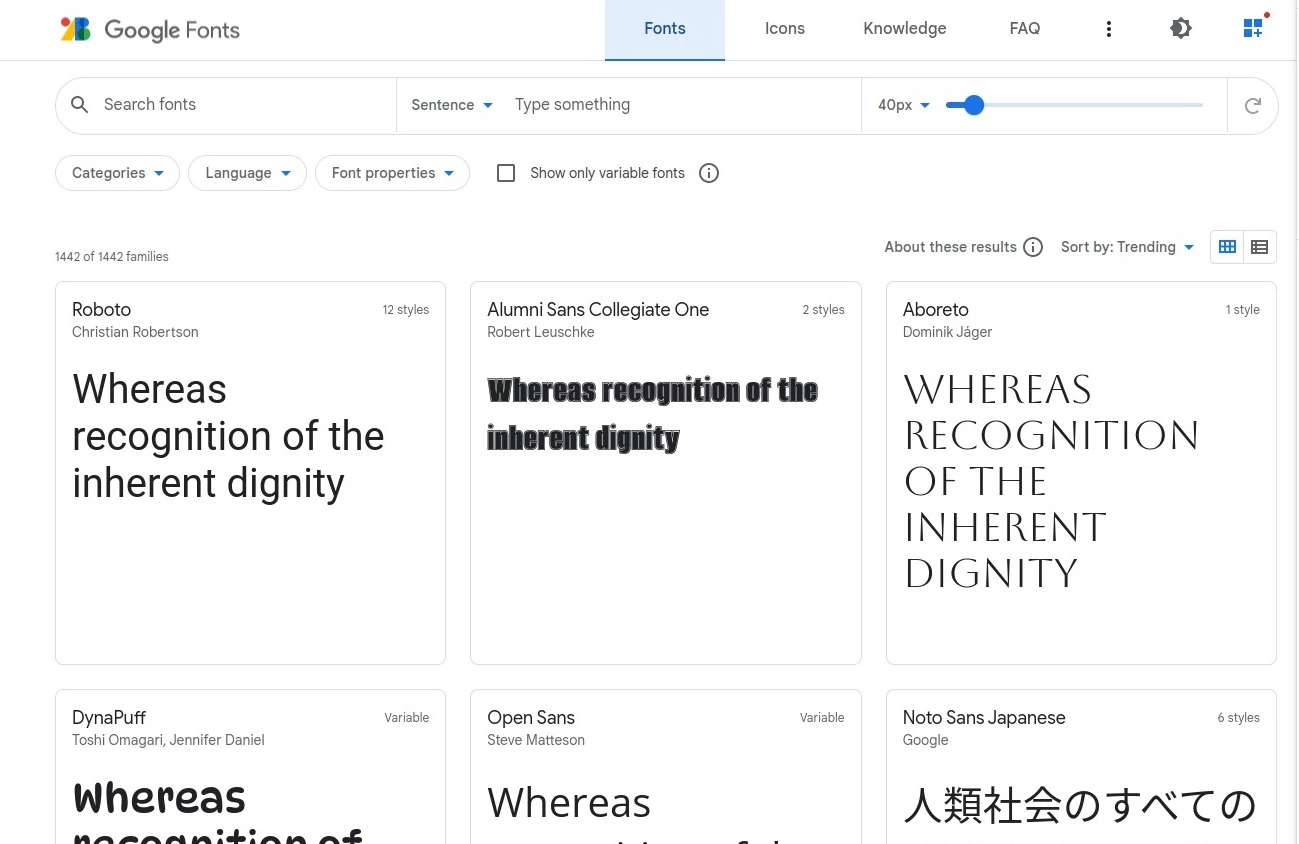
The second way is via the dynamic integration of the files directly from the Google server, how the integration is done can be seen on the right screenshot which comes directly from the Google Fonts page. We can find this integration with our Google Fonts Checker and display it to you.
Even if it is technical, these are the CSS instructions (CSS: language with which the design of websites is determined) that are executed every time a visitor calls up your website.
These instructions cause the visitor's browser to connect to Google servers and download the font descriptions and the corresponding font files from there.
This inevitably involves the transfer of visitor data, which is technically impossible. Above all, this is at least the IP address, but a range of other data is also transmitted when the website is accessed, which can then be combined with the IP address.
As a website operator, you are therefore "forcing" your visitors to pass on data to Google, even though these visitors may not want this or have not consented to this transfer.
Google Fonts - Data protection background / GDPR - Google Fonts Checker
In principle, the GDPR is intended to protect the privacy of natural persons when processing personal data. Everyone has the right to decide for themselves what should happen to their own data and who may have access to it.
For this reason, the processing of this data is generally prohibited under the GDPR, unless there is a reason or release provided for under the GDPR. These points can be found in the notorious Art. 6 GDPR. Personal data also includes the IP address and this is the cause of the problem in connection with Google Fonts, which are integrated by Google pages.
This is why, for example, the Munich Regional Court wrote in its important ruling on this topic
"The dynamic IP address constitutes personal data for a website operator, because the website operator has abstract legal means that could reasonably be used to have the person concerned determined with the help of third parties, namely the competent authority and the Internet access provider, on the basis of the stored IP addresses (BGH, judgment of 16.05.2017, Ref. VI ZR 135/13). It is sufficient for the defendant to have the abstract possibility of identifying the persons behind the IP address. It does not matter whether the defendant or Google has the concrete possibility of linking the IP address to the plaintiff."
As there is generally no consent from visitors, no contractual relationship of any kind with visitors and no other reasons that justify the data transfer, Google Fonts may not be used in this way. Since local integration is also technically possible without any problems, there is no reason to transfer the data. We have provided you with the free Google Fonts Checker so that you can check this at any time.
Are Google Fonts GDPR compliant?
The dynamic integration of Google Fonts is not GDPR-compliant without the consent of the visitor - it is best to check the integration directly with our Google Fonts Checker. Website operators owe injunctive relief and damages - at least according to the Munich Regional Court, judgment of 20.01.2022, ref. 3 O 17493/20. The extent to which this also applies to other US services is currently still open, but it can be assumed that this also applies.
In the court's view, the question of whether a GDPR infringement must have reached a certain level of materiality in order to justify the award of damages is irrelevant. The loss of control associated with the transfer of data to Google and the individual discomfort felt by the plaintiff were so significant that this justified a claim for damages.
The answer is therefore clear: no.
What exactly did the Munich Regional Court decide on the subject of Google Fonts?

The dynamic integration of Google Fonts without the user's consent violates their personal rights. This was decided by the Regional Court of Munich (LG Munich, judgment of 20.01.2022, Ref. 3 O 17493/20).
In a legal dispute before the Regional Court of Munich, the plaintiff objected to the defendant disclosing his own IP address to Google when he visits the website published by the defendant that uses Google Fonts.
The use of Google Fonts in this form must be refrained from
The defendant is ordered to refrain from disclosing the plaintiff's IP address to the provider of Google Fonts by providing a font from the provider Google (Google Fonts) when a website operated by the defendant is accessed by the plaintiff, subject to a fine of up to € 250,000.00 to be imposed for each case of infringement, or alternatively imprisonment or detention for up to six months.
Disclosure of the IP address without consent violates personal rights
LG Munich: The unauthorized disclosure of the dynamic IP address of the plaintiff by the defendant to Google constitutes a violation of the general right of personality. The defendant's right to informational self-determination pursuant to Section 823 (1) BGB was affected. The plaintiff had not consented to the interference in accordance with Section 13 (2) Telemedia Act (TMG) old version, Art. 6 (1) lit. a of the General Data Protection Regulation (GDPR).
IP address is personal data
The IP address passed on constitutes personal data within the meaning of Section 12 (1) and (2) TMG (in the version applicable at the time of disclosure), Section 3 (1) Federal Data Protection Act and Art. 4 no. 1 GDPR, as the website operator has abstract legal means that could reasonably be used to have the person concerned identified using the stored IP addresses with the help of third parties, namely the competent authority and the internet access provider (BGH, judgment of 16.05.2017 - VI ZR 135/13). It is sufficient for the defendant to have the abstract possibility of identifying the persons behind the IP address. It does not matter whether the defendant or Google has the concrete possibility of linking the IP address to the plaintiff.
Use of Google Fonts is possible without transferring data to Google
There is also no justification for this interference with the plaintiff's general right of personality. A legitimate interest of the defendant within the meaning of Art. 6 para. 1 f) GDPR, as claimed by the defendant, does not exist, because Google Fonts can also be used by the defendant without a connection to a Google server being established when the website is accessed and the IP address of the website user being transmitted to Google.
Risk of repetition is given
Furthermore, the plaintiff was also not obliged to conceal his IP address before accessing the defendant's website. The court also affirmed a risk of repetition. The risk of repetition is not eliminated by the fact that the defendant now uses Google Fonts in such a way that the IP address of website visitors is no longer disclosed to Google. The risk of repetition can only be eliminated by a declaration to cease and desist with a penalty clause.
Data protection level in the USA not adequate
Munich Regional Court awarded the defendant damages under Art. 82 (1) GDPR. Whether the materiality threshold was exceeded in the case of the immaterial damage in question could be left open. In view of the plaintiff's loss of control over personal data to Google, a company that is known to collect data about its users, and the individual discomfort felt by the plaintiff as a result, the associated interference with the general right of personality is so significant that a claim for damages is justified.
It must also be taken into account that it is undisputed that the IP address was transmitted to a Google server in the USA, whereby no adequate level of data protection is guaranteed there (see ECJ, judgment of 16.7.2020 - C-311/18 (Facebook Ireland and Schrems), NJW 2020, 2613) and the liability under Art. 82 para. 1 GDPR is intended to prevent further infringements and create an incentive for security measures. The amount of damages claimed is appropriate in view of the severity and duration of the infringement and is not contested by the defendant.
Here is the solution - Google Fonts on your own server
In principle, there is only one sensible way to prevent the integration of fonts directly via Google. You can do this without compromising on speed and data protection if you store the fonts / Google Fonts on your server and make them available to your visitors from there. Here we explain how this works and give you all the technical details for the fonts you use!
Google offers the option of downloading the fonts and saving and installing them on your own server. This is explicitly permitted by the license used - at no extra cost! You can use the font files on any website, both for business and private use. Further information can be found in the Google FAQ: https://developers.google.com/fonts/faq
How do you get the files onto your site?
The integration takes place in two steps. In the first step, you download the necessary files from Google and then save them in your web space on your server.
Do you need help?
If this is too technical for you or you do not manage your site yourself, please contact us directly - we will be happy to help you, the effort for the customization is usually within manageable limits.
Click here for the request form.
The best option for downloading all the necessary files is currently the google-webfonts-helper from Mario Ranftl. With this service, you can not only simply select the right font and font size for your website. You also receive the appropriate CSS code and all the required font formats. And all on one page. Further down on the results page you will find a list with the links to the fonts you are using. You don't have to search for anything!
On the google-webfonts-helper page itself, you will find a large download button that you can use to download the font files you want. Click on this button to download the font files you use.
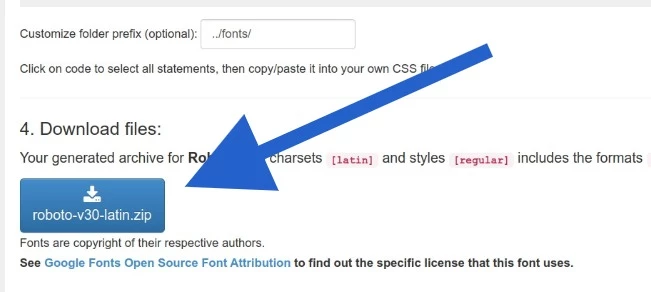
After downloading, copy all unzipped (important!) font files to your server using your FTP program. Please remember the path / folder where you saved the files, you will need them in the next step!
Integrate Google Fonts into your website
To make the font files / fonts available on your website, i.e. to ensure that the fonts are also used, you must adapt your CSS files or your theme. Copy the CSS code that is displayed on google-webfonts-helper for all required fonts. Example for the Roboto font, proceed in the same way for all other fonts:
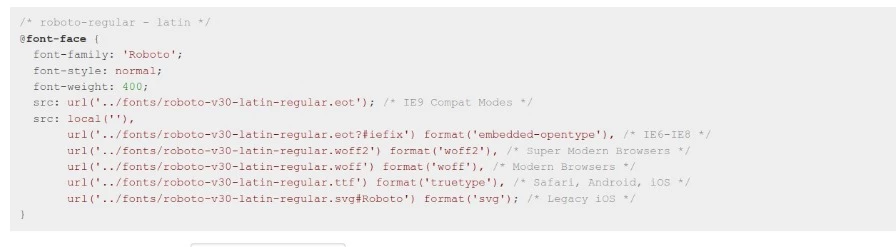
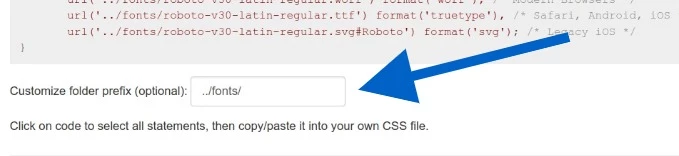
You must of course make sure that the path used is correct (which you have noted above), otherwise the fonts will not be loaded.
However, google-webfonts-helper also offers the option of specifying the path to the directory.
Local integration via plugin for CMS / store systems
For some CMS / store systems, it is possible to integrate fonts directly locally or to prevent Google Fonts from being called up directly. Unfortunately, with most systems you actually have to do this manually and edit data in templates. As an example, we have listed some Wordpress plugins here.
Wordpress
- Plugin Embed Google Fonts (please note that some themes / theme builders do not process this correctly)
- Disable and Remove Google Fonts
- Host Web Fonts Local